
 en
en
How to Play CS2 on FACEIT: Complete Beginner's Guide

18 Apr, 2026, 20:24
|Last updated: 18 Apr, 2026, 20:24
How to Play CS2 on FACEIT: Complete Beginner's Guide
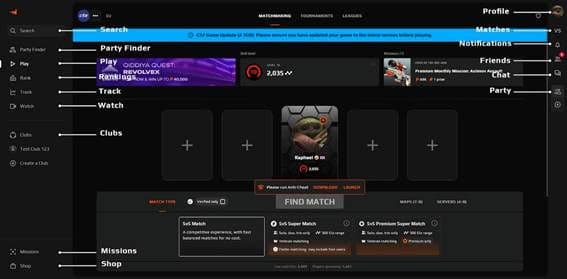
FACEIT is a third-party matchmaking platform for CS2. If you've been playing Valve matchmaking and a teammate told you to try it, this guide covers everything you need to get started: what FACEIT is, how it compares to CS2 Premier, how to create an account, and how to play your first match.
What is FACEIT, and why should you care?
FACEIT is a third-party matchmaking platform that runs CS2 matches outside of Valve's servers. Players move there for three main reasons: the dedicated FACEIT AC anticheat is stricter than VAC, all matches run on 128-tick servers, and the 5v5 format includes a map pick/ban phase that standard matchmaking lacks.
The player pool on FACEIT tends to be more focused than casual Valve queues. Players are there specifically to compete, which changes the atmosphere of matches.
FACEIT also supports other games, but CS2 is its largest title by active player count.
FACEIT vs CS2 Premier, which should you play?
This is one of the most common questions from players who are new to FACEIT CS2. The short answer: both are 5v5 competitive modes, but they work differently.
|
Feature |
CS2 Premier |
FACEIT Free |
FACEIT Premium |
|
Anticheat |
VAC (Valve) |
FACEIT AC |
FACEIT AC |
|
Matchmaking system |
Hidden MMR + CS Rating |
ELO-based (Levels 1-10) |
ELO-based (Levels 1-10) |
|
Server tickrate |
64-tick |
128-tick |
128-tick |
|
Map pick/ban |
Active Duty only |
Yes |
Yes |
|
Stats tracking |
Limited |
Basic |
Full |
|
Cost |
Requires Prime (~$15) |
Free (email verify) |
$10.99/month |
|
Queue times |
Fast |
Fast |
Fast |
CS2 Premier uses a hidden MMR system with a CS Rating number. FACEIT uses a visible ELO number that maps to Levels 1 through 10. You can read more about how that Premier number works in our CS2 Premier rating system explained article.
If you're new to competitive CS2, start with Premier and get comfortable first. Our guide on how to unlock CS2 Premier walks you through the steps to get into a ranked match within an hour. Once you're hitting consistent wins and running into cheaters regularly, FACEIT is the logical next step.
Is FACEIT free? Requirements and cost breakdown
Yes, the basic version of FACEIT is free. You create an account, verify your email, and you can queue for matches. No subscription is needed to play.
FACEIT runs on 128-tick servers on all plans, including the free tier. That alone is a practical upgrade from Valve's 64-tick default.
Does FACEIT require CS2 Prime?
Historically, FACEIT has required Prime Status for CS2 account verification. Prime Status costs around $15 as a one-time purchase through Steam and is also required for CS2 Premier.
|
Plan |
Cost |
What you get |
|
FACEIT Free |
Free (requires account verification) |
5v5 matchmaking, FACEIT AC, 128-tick servers, basic stats |
|
FACEIT Plus |
$6.99/month |
Ad-free experience, additional stats, priority support |
|
FACEIT Premium |
$10.99/month |
Priority queue, advanced stats, coaching tools, leagues |
The free tier covers everything a new player needs. Premium is worth considering once you're playing regularly and want access to leagues and detailed performance data.
How to create a FACEIT account and link CS2
- Go to faceit.com and click Sign Up.
- Create an account using your email address, or sign in directly with your Steam account.
- Verify your email address. This step is required before you can queue.
- Link your Steam account: go to Settings > Game Integrations and connect CS2.
- If required, verify your Prime Status through Steam. FACEIT checks this during account setup.
- Download and install the FACEIT Client if prompted. The FACEIT AC anticheat runs through the client and must be active during matches.
- Head to the CS2 section, click Find a Match, and queue.
Use the same Steam account you play CS2 on. Linking a different account causes issues with rank verification.
FACEIT ranks and ELO system explained (Levels 1-10)
FACEIT CS2 ranks run from Level 1 to Level 10, each tied to an ELO range. Unlike Valve's hidden MMR, your ELO number on FACEIT is visible at all times. To understand how this differs from how CS2 ranking works inside Valve's own system, the main difference is transparency: you always know your exact number and how far you are from the next level.
The table below shows the FACEIT levels to CS2 ranks conversion, with approximate CS2 Premier equivalents for reference. For a full breakdown of those CS2 ranks, see our CS2 ranks explained guide.
|
FACEIT Level |
ELO range |
CS2 Premier equivalent (approx.) |
|
Level 1 |
Up to 800 |
Silver / Gold Nova |
|
Level 2 |
801-950 |
Gold Nova / Master Guardian |
|
Level 3 |
951-1,100 |
Master Guardian |
|
Level 4 |
1,101-1,250 |
Master Guardian Elite |
|
Level 5 |
1,251-1,400 |
Distinguished Master Guardian |
|
Level 6 |
1,401-1,550 |
Legendary Eagle |
|
Level 7 |
1,551-1,750 |
Legendary Eagle Master |
|
Level 8 |
1,751-2,000 |
Supreme Master First Class |
|
Level 9 |
2,001-2,250 |
Global Elite |
|
Level 10 |
2,251+ |
Top Global Elite / Pro level |
You gain ELO for wins and lose it for losses. The exact amount gained or lost depends on the skill difference between the two teams: beating a higher-ELO team earns more, losing to a lower-ELO team costs more. Early in your FACEIT career, the swings are larger as the system calibrates your starting level.
Level 5 and Level 6 are roughly average across the active player base. If you're at that range, you're in the middle of the distribution.
How to play your first FACEIT match
New players are regularly caught off guard by the format. Here's exactly what happens when you queue.
- Open the FACEIT Client and log in.
- Select CS2 from the game list and click Find a Match.
- Wait for 10 players to be found. When a match is ready, you get a notification. Accept it within the time limit or you receive a queue cooldown.
- Once all 10 players accept, both teams take turns banning maps. You vote on which map to remove from your side.
- The remaining map loads. Both teams are assigned CT or T side and the match runs as a standard 5v5.
- After the match ends, your ELO updates based on the result and the skill gap between the two teams.
Your first 10 matches on FACEIT are placement matches. Results in those games carry more weight and set your starting level, so queue when you're focused and not on a losing streak.
FACEIT tips for beginners, how to climb faster
- Warm up before your placement matches. Play a few Deathmatch or CS2 Premier rounds first. Your ELO from the first 10 games directly determines your starting level, and climbing from a low starting point takes dozens of matches.
- Use a microphone. The FACEIT player pool is more serious than casual Valve matchmaking. Calling positions, coordinating buys, and giving mid-round updates makes a visible difference at Levels 1 through 5.
- Use the map veto strategically. Ban maps where you have a weak win rate, not just maps you find boring. If you play Dust 2 well and the opponent bans Mirage, you've already narrowed the pool in your favor. Our CS2 grenade lineup practice guide can help you build confidence on specific maps before you stop banning them.
- Check your stats between matches. The FACEIT client shows your win rate per map, your K/D trend, and your ELO history. Use that data to decide which maps to practice and which ones to keep banning.
- Queue at peak hours. Matchmaking in the evenings for your region means faster queues and opponents who are warmed up. Late-night queues take longer and the player pool is smaller.
- Don't queue while tilted. FACEIT matches run 30 to 45 minutes each. Losing two in a row and immediately re-queuing tends to cost more ELO than it recovers. Take a break, then come back.
How to watch FACEIT demos in CS2
Reviewing your own matches is one of the fastest ways to identify mistakes. Here's how to watch FACEIT demos in CS2.
- Go to your FACEIT profile and click on Match History.
- Find the match you want to review and click on it to open the match page.
- On the match page, click the Download Demo or Watch Demo button. The .dem file downloads to your computer.
- Open CS2 and open the developer console. Type playdemo followed by the full file path and filename, then press enter.
- The demo loads in-game. Use the demo viewer controls to fast-forward, rewind, or switch to any player's perspective.
Turn on X-Ray view in the demo viewer to see both teams' positions at the same time. It's the fastest way to spot where your positioning broke down on a specific round.
Note: the demo download link on FACEIT can disappear after a few weeks for older matches. Download demos you want to review soon after playing.
Is FACEIT worth it? Verdict
FACEIT is worth it for players at Master Guardian level or above who are regularly encountering cheaters on Valve servers. The 128-tick servers and stricter FACEIT AC anticheat address the two biggest complaints about Valve matchmaking at that level. If you're already at a level where CS2 Premier feels unfair due to cheating, FACEIT is the better environment.
Below that level, CS2 Premier is fine. The skill gap between FACEIT and Premier is smaller at lower ELO, and the Premier player pool is larger, which means faster queues. If you haven't hit the cheater problem yet, there's no rush to switch.
FACEIT Free gives you everything you need to try it without spending anything. If you're still exploring competitive CS2 modes, the CS2 Wingman ranks guide covers the 2v2 option, and the CS2 esports schedule keeps you up to date on pro matches.
If you're hitting consistent cheaters in CS2 Premier and you're around Master Guardian or above, switch to FACEIT. If you're newer to ranked play, stay in Premier until you outgrow it.
Check Strafe Esports for more CS2 guides, match coverage, and the full esports schedule.
Feature image credit: Valve