
Best Call of Duty: Warzone PC settings for maximum performance

Best Call of Duty: Warzone PC settings for maximum performance

Ganesh Jadhav

9 Nov, 2023, 11:01

|

Last updated: 10 Apr, 2025, 18:30

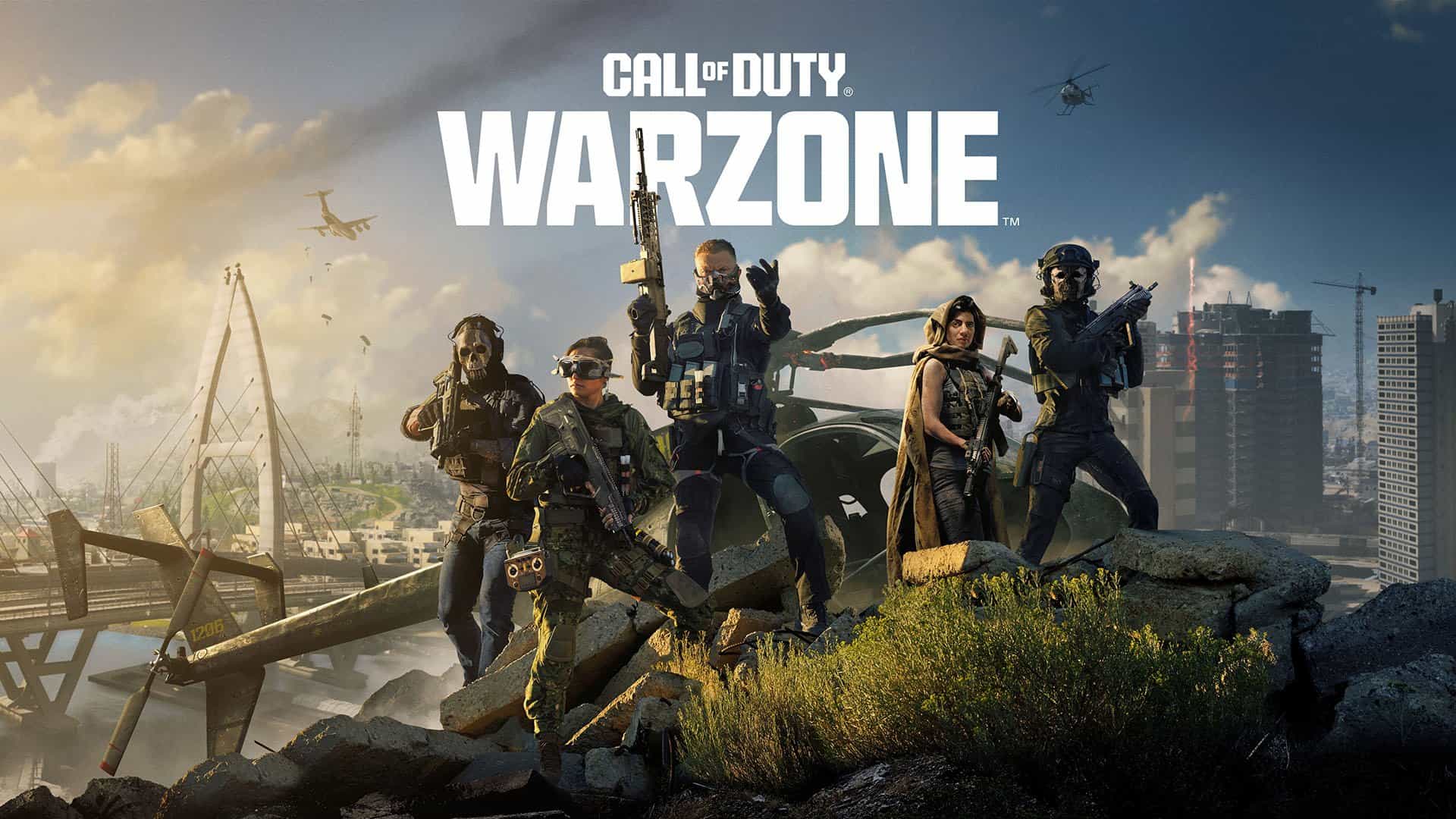
The Call of Duty: Warzone Season 1 kicked off on 8th December and has introduced a plethora of new features including a brand new map Urzikstan.

Similar to its predecessors the current Call of Duty: Warzone supports PC. The recommended system requirements for the game are as follows:

  • Processor - Intel® Core™ i5-6600K / Core™ i7-4770 or AMD Ryzen™ 5 1400
  • Graphics Card - NVIDIA® GeForce® GTX 1060 or AMD Radeon™ RX 580 - DirectX 12.0 compatible system
  • RAM - 12 GB
  • Disk Space - 125 GB

These requirements aren’t as heavy, but take a toll on the system, especially your CPU. The strain on the system can lead to frame drops, throttling fps or in-game lag. To avoid such a circumstances, use the following Warzone settings to get maximum performance out of your PC.

Best Call of Duty: Warzone PC settings

Display Settings
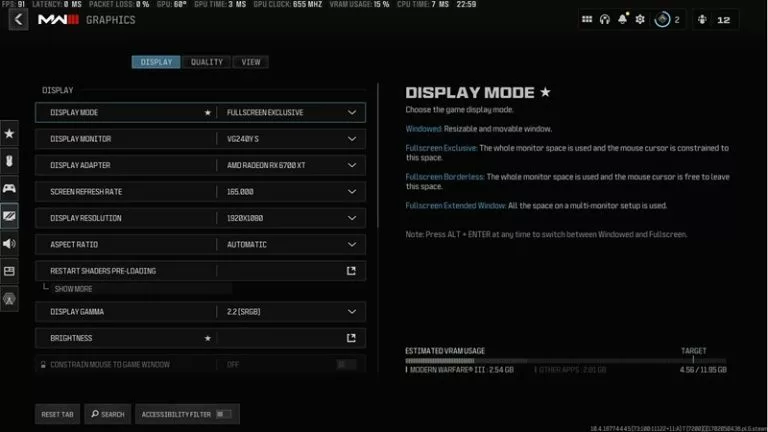
Call of Duty: Warzone II Display Settings (credits: Screeshot via Call of Duty)

  • Display Mode: Fullscreen Exclusive (Using Fullscreen Exclusive gives COD the direct control of the screen and hence leads to a better performance.)
  • Display Monitor: Select your primary monitor.
  • Display Adapter: Select your primary graphics card.
  • Screen Refresh Rate: Select monitor’s refresh rate.
  • Display Resolution: Use the monitor's native resolution.
  • Display Gamma: 2.2 (sRGB)
  • Brightness: Personal preference
  • Eco Mode Preset: Custom
  • V-Sync (Gameplay): Off
  • V-Sync (Menus): Off
  • Custom Frame Rate Limit: Custom
    • Gameplay: 300 (Choose the lowest of 2x monitor refresh rate or 300)
    • Menu: 90
    • Out of focus: 30
  • Focused Mode: 0
  • High Dynamic Range (HDR): Off (Set it off to get a better performance)

Quality Settings
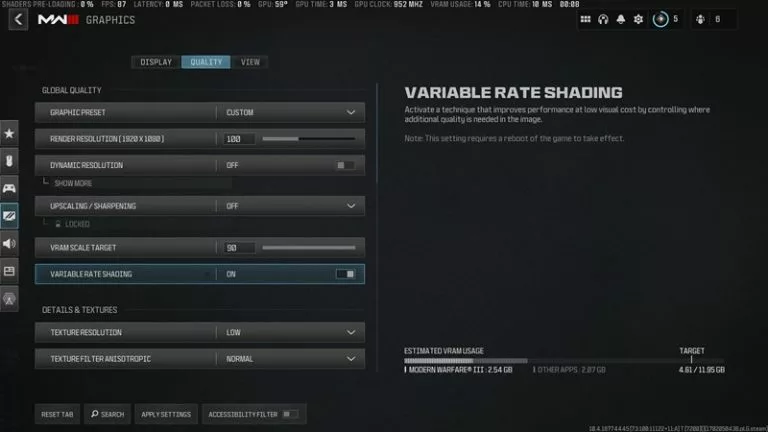
Call of Duty: Warzone II Quality Settings (credits: Screeshot via Call of Duty)

  • Graphic Preset: Custom
  • Render Resolution: 100 (Lower to 75 if the VRAM size is lower)
  • Dynamic Resolution: Off (Increases CPU load)
  • Upscaling / Sharpening: Ideally Off (Use FidelityFX CASS if required with 75 strength)
  • VRAM Scale Target: Maximum
  • Variable Rate Shading: On
  • Texture Resolution: Normal
  • Texture Filter Anisotropic: Normal
  • Depth of Field: Off
  • Detail Quality Level: Normal
  • Particle Resolution: Very Low
  • Bullet Impacts: Off
  • Persistent Effects: Off
  • Shader Quality: Medium
  • On-Demand Texture Streaming: On (can switch it off but lowers visual details)
  • Local Texture Streaming Details: Normal
  • Shadow Quality: Normal
  • Screen Space Shadows: Off
  • Ambient Occlusions: Dynamic Objects
  • Screen Space Reflections: Normal
  • Static Reflection Quality: High
  • Tessellation: Near
  • Volumetric Quality: Medium
  • Deferred Physics Quality: Low
  • Weather Grid Volumes: Normal or Low
  • Water Quality: Water Caustics

View Settings
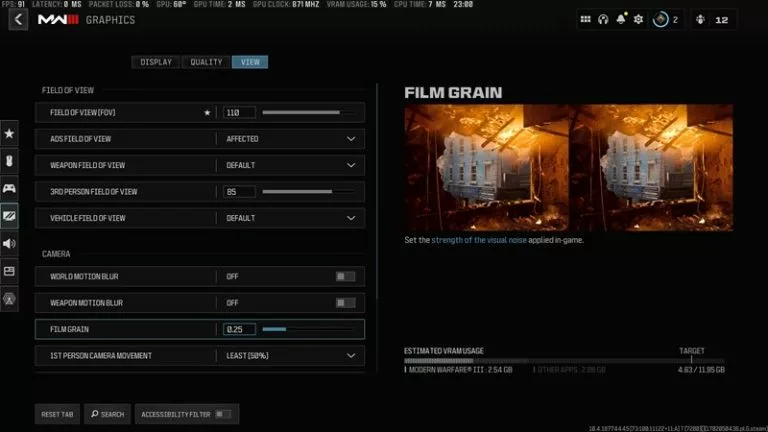
Call of Duty: Warzone II View Settings (credits: Screeshot via Call of Duty)

  • FOV: 100 - 110 (Personal preference)
  • ADS FOV: Affected
  • Weapon FOV: Default
  • 3rd Person FOV: 80 - 100 (Personal preference)
  • Vehicle FOV: Default
  • World Motion Blur: Off
  • Weapon Motion Blur: Off
  • Film Grain 0.25
  • 1st Person Camera Movement: Least
  • 3rd Person Camera Movement: Least
  • 3rd Person ADS transition: Personal preference
  • Spectator Camera: Personal preference
  • Inverted Flashbang: Off

These settings tweak the visual aspects of the game to get maximum performance out of the system. Using the in-game presets also works if you have a Nvidia GeForce RTX 3070 Ti / AMD Radeon 6800 XT card or higher.

Featured Image Credits: Call of Duty Blog

Read More: Call of Duty launches Call of Duty: Warzone Urzikstan trailer

Latest news

Lamborghini to Sponsor DreamHack Events

Lamborghini to Sponsor DreamHack Events

An unlikely partnership, but one that is as real as anything else; ESL FACEIT Group (EFG) has announced a long-term deal with none other than Italian luxury car brand Automobili Lamborghini. This means that Lamborghini will be the Official Automotive Partner for DreamHack events moving forward, starting with DreamHack Atlanta (May 15-17) in the US.
12 May
Martin Arévalo-Östberg

KeSPA Returns to the Table: Partnership Resumes with Esports Nations Cup for 2026 Edition

KeSPA and the Esports Foundation have to an agreement, bringing the South Korean association back into the fold as National Team Partner, and by extension returns South Korea to the list of nations for the ENC.
9 May
Foo Zen-Wen

Esports Foundation Club Partner Program: Understanding the Engine Behind EWC

The Club Partner Program (CPP) is one of the Esports Foundation (EF) flagship initiatives centered around providing investment and incentives to a select group of esports organizations that are members of the club. It consists of its own ecosystem of support for organizations as well as providing said organizations with a separate track for winning prize money – the Club Championship. But what do we actually know about how it works? Join us as we listen to industry staples speak on their experience.
1 May
Foo Zen-Wen

Xbox Game Pass Gets Price Cut, Drops Call of Duty at Launch

As a response to the player feedback, Xbox Game Pass will now be available for a discounted rate. The catch, however, is that Call of Duty won’t be included at launch. Meaning, if you want to play Call of Duty at launch, you’d have to buy the game.
21 Apr
Ganesh Jadhav

Esports Nations Cup 2026 Confirms 16-Game Lineup for the Inaugural Event

The Esports Foundation has officially confirmed the complete 16-game lineup for the Esports Nations Cup 2026, the inaugural global nation-based esports competition set to take place in Riyadh, Saudi Arabia, from November 2–29, 2026. Over 100,000 players are expected to compete across hundreds of qualification events spanning 100 nations and territories throughout the year.
8 Apr
Kaustavmani Choudhury

Disney+ Expands KeSPA Partnership to Stream More Esports Events in 2026

Disney+ has announced an expanded partnership with the Korea e-Sports Association (KeSPA) to livestream a wider slate of Korean and pan-Asian esports competitions globally throughout 2026, building on an initial deal signed in September 2025.
6 Apr
Kaustavmani Choudhury

Esports Foundation Announces the 40 Clubs for 2026 Club Partner Program

Today, the Esports Foundation (EF) announced the selected 40 esports clubs for the 2026 Club Partner Program. The program, a $20M dollar initiative, provides funding and support for all the selected clubs. Now in its 3rd year, over $100M has been reportedly invested to date.
31 Mar
Foo Zen-Wen

Comments (0)

Log in to comment on this match