

 en
en
Can You Play Dota 2 Offline? Complete Guide

8 Jun, 2026, 08:39
|Last updated: 8 Jun, 2026, 08:39
Can You Play Dota 2 Offline? Everything You Need to Know
Yes, you can play Dota 2 offline, but only against bots. Steam's offline mode lets you launch Practice vs AI matches without an internet connection. Online matchmaking, including ranked and unranked games, requires a live connection to Valve's servers and is not available offline.
|
Feature |
Available offline? |
Notes |
|
Practice vs AI (bot matches) |
Yes |
Fully available in Steam offline mode |
|
Online matchmaking (Ranked) |
No |
Requires internet connection |
|
Online matchmaking (Unranked) |
No |
Requires internet connection |
|
Playing with human friends |
No |
Requires server connection |
|
Custom lobbies with bots |
Yes (limited) |
Some custom game modes may need a connection |
|
LAN multiplayer |
Complex |
Requires initial Steam login and a dedicated server |
|
Downloading updates |
No |
Steam needs internet to update |
Can you play Dota 2 offline?
Dota 2 does not have a native offline mode. What you can use is Steam's offline mode, which lets the game run without an active connection to Valve's servers. In that state, Practice vs AI bot matches work fully. All online features, including matchmaking queues, friend lobbies, and the in-game shop, require an internet connection. The distinction is that it is Steam going offline, not Dota 2 itself.
How to play Dota 2 offline with bots, step by step
1. Open Steam while connected to the internet and log in to your account.
2. Launch Dota 2 at least once while online to confirm game files are up to date.
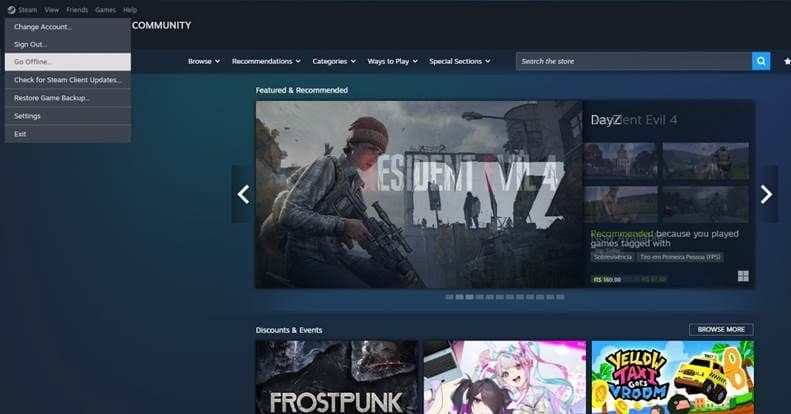
3. In the Steam client, click your account name in the top-right corner and select Go Offline..., then confirm the dialog.
4. Steam will restart in offline mode. Launch Dota 2.
5. In the Dota 2 main menu, go to Play Dota and select Practice vs AI or Bot Match.
6. Choose your hero, set bot difficulty, and start the game. No internet connection is needed.
Tip: Switch Steam to offline mode before you lose your connection. You cannot switch to offline mode once you are already disconnected without a prior cached login. That cache also expires after extended periods without an online login.
New to the game? Read Dota 2 roles explained for beginners to learn the positions before your first real match.
What is the Dota 2 'Game Coordinator offline' error?
The Game Coordinator (GC) is Valve's matchmaking server. It manages queues, lobbies, and item drops for Dota 2. When you see "Game Coordinator Status: Offline," it means Valve's servers are down, not your internet connection.
During a GC outage, you cannot queue for matches but can still play bot matches through Steam's offline mode. To check status, look at the official Dota 2 account on X (@DOTA2) or the Steam status page. Most GC outages clear within 30 to 60 minutes.
Why is Dota 2 stuck in offline mode? (and how to fix it)
Dota 2 can appear stuck in offline mode even when your internet is working. The cause is almost always on the Steam side.
|
Cause |
Fix |
|
Steam is set to offline mode manually |
Go to the Steam menu, click Go Online..., then restart Steam |
|
Steam cannot reach Valve servers (firewall, VPN, or ISP block) |
Disable VPN, check your firewall settings, or try a different network |
|
Corrupted Steam cache |
Go to Steam > Settings > Downloads > Clear Download Cache, then restart |
|
Dota 2 game files corrupted |
Right-click Dota 2 in your Steam library, go to Properties > Local Files > Verify Integrity of Game Files |
|
Steam not detecting internet connection |
Restart your modem and router, then relaunch Steam as administrator |
|
Steam credential cache expired |
Reconnect online and log in again to refresh the cache |
If none of these fixes work, check the Steam Community forums or r/DotA2. Widespread issues get reported there within minutes.
How to appear offline in Dota 2
Dota 2 uses Steam's friend status system. To hide your online status from friends:
1. In the Steam client, click your profile name at the top of the window.
2. In the dropdown menu, select Invisible. This shows you as offline to all Steam friends.
3. Steam will display your status as offline while you continue to play normally.
You can also change your status inside Dota 2 through the social menu, but the Steam client method is more reliable. Appearing offline does not affect matchmaking. You are still placed into ranked and unranked games as normal.
Can you play Dota 2 LAN offline with friends?
Dota 2 does not have a built-in LAN mode. Starting any multiplayer lobby requires a connection to Valve's servers. Dedicated server hosting is technically possible but needs an initial Steam login, a configured local network, and separate server tools. For casual play with friends, the practical option is a private lobby with a working internet connection. The Steam Community guide on dedicated servers covers the full technical setup.
Can you download and play Dota 2 without Steam?
No. Dota 2 is only available through Steam. Third-party offline installers, including tools that use RevLoader or any other cracked method, are unauthorized versions that violate Steam's Terms of Service and can carry malware. Do not use them.
Dota 2 is free to play. Download the Steam client at store.steampowered.com, create a free account, and install Dota 2 at no cost.
When you are ready to go online, check Dota 2 ranks and MMR explained to understand the ranking system. Read how to check your Dota 2 MMR before your first ranked games. Dota 2 calibration explained covers how your initial rank gets set. Follow the Dota 2 esports schedule on Strafe for upcoming matches and tournaments.
Feature image credit: Valve