
 en
enHow to Use Pings in League of Legends: Complete Guide
Effective communication is critical in League of Legends. With fast-paced gameplay and limited time to type messages, pings offer a quick and simple way to relay vital information to your team. From signaling enemy movement to requesting assistance, pings can turn the tide of a match when used correctly.
This guide will explain how to use pings in League of Legends to enhance team coordination and gameplay efficiency. Learn how to use pings in League of Legends to improve communication, coordinate plays, and gain the upper hand on the Rift.
What Are Pings in League of Legends?
Pings are visual alerts that allow players to communicate important details to their teammates during a match. These alerts can be placed on the main map, the mini-map, and even on units or structures. Pings serve a tactical purpose, enabling teams to coordinate plays, identify threats, or strategize with minimal effort.
Players can use pings at any time during the game. However, there is a restriction on how many pings can be issued. No more than 6 pings can be used within 5 seconds. Exceeding this limit activates a lockout, preventing further pings for a short duration and displaying a warning message in chat.
Types of Pings in League of Legends
There are two main types of pings: Regular Pings and Smart Pings. Both are essential tools for communication and can be used in different ways to send specific messages.
Regular Pings
Regular pings are the simplest form of communication. They are divided into two categories:
- Generic Ping: Used to gain a player’s attention or notify them of a location. Players can activate this by pressing G + Left Mouse Button (LMB) or Alt + LMB.
- Caution Ping: Alerts teammates about potential danger. This ping is activated using V + LMB or Ctrl + LMB.
How to Use Regular Pings
- Generic Ping: Use this ping to signal targets, areas, or objectives that need attention. For example, pinging the Baron Nashor can let your team know it’s time to contest it.
- Caution Ping: Use this ping to warn teammates of danger. If an enemy is missing or likely to ambush, ping the area to alert your allies.
Both pings can be placed directly on the ground, mini-map, or units like enemy champions, turrets, and jungle monsters.
Examples of Regular Ping Usage
- Pinging an enemy champion icon signals to focus or avoid them.
- Pinging an allied turret with a Generic Ping tells teammates to defend it.
- Using Caution on allied champions lets them know to retreat.
Smart Pings
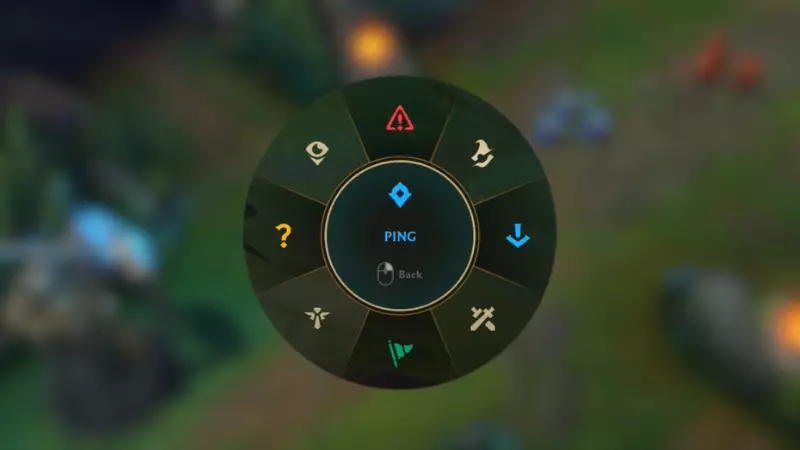
Smart pings allow players to communicate specific messages with more precision. These pings are activated using the Ping Wheel, which appears by holding G, V, Ctrl, or Alt + LMB. Once the wheel is visible, players can drag the cursor to select the appropriate ping.
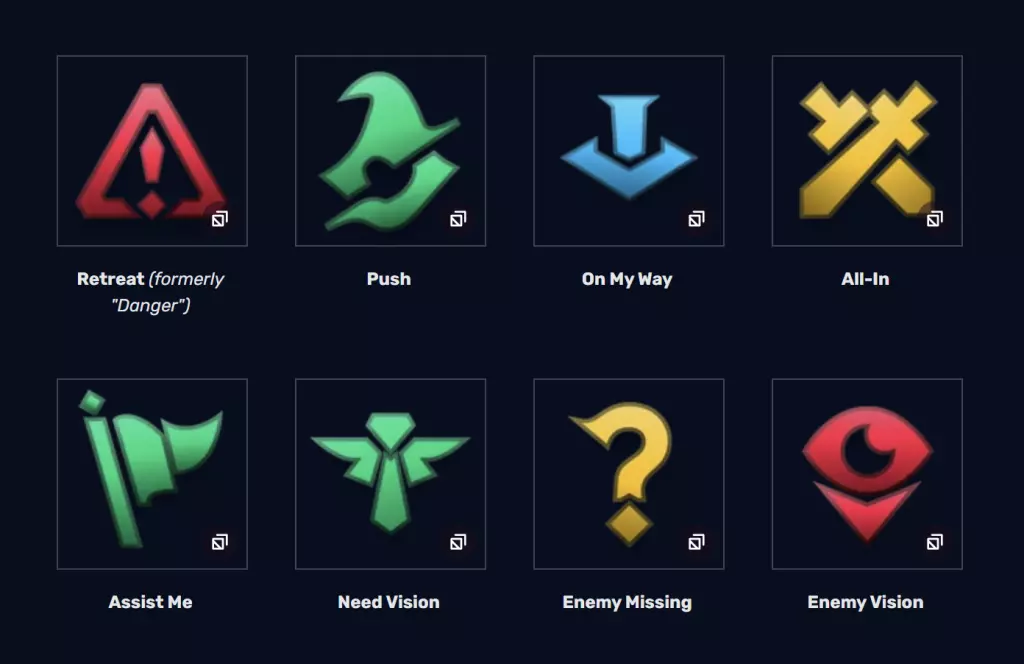
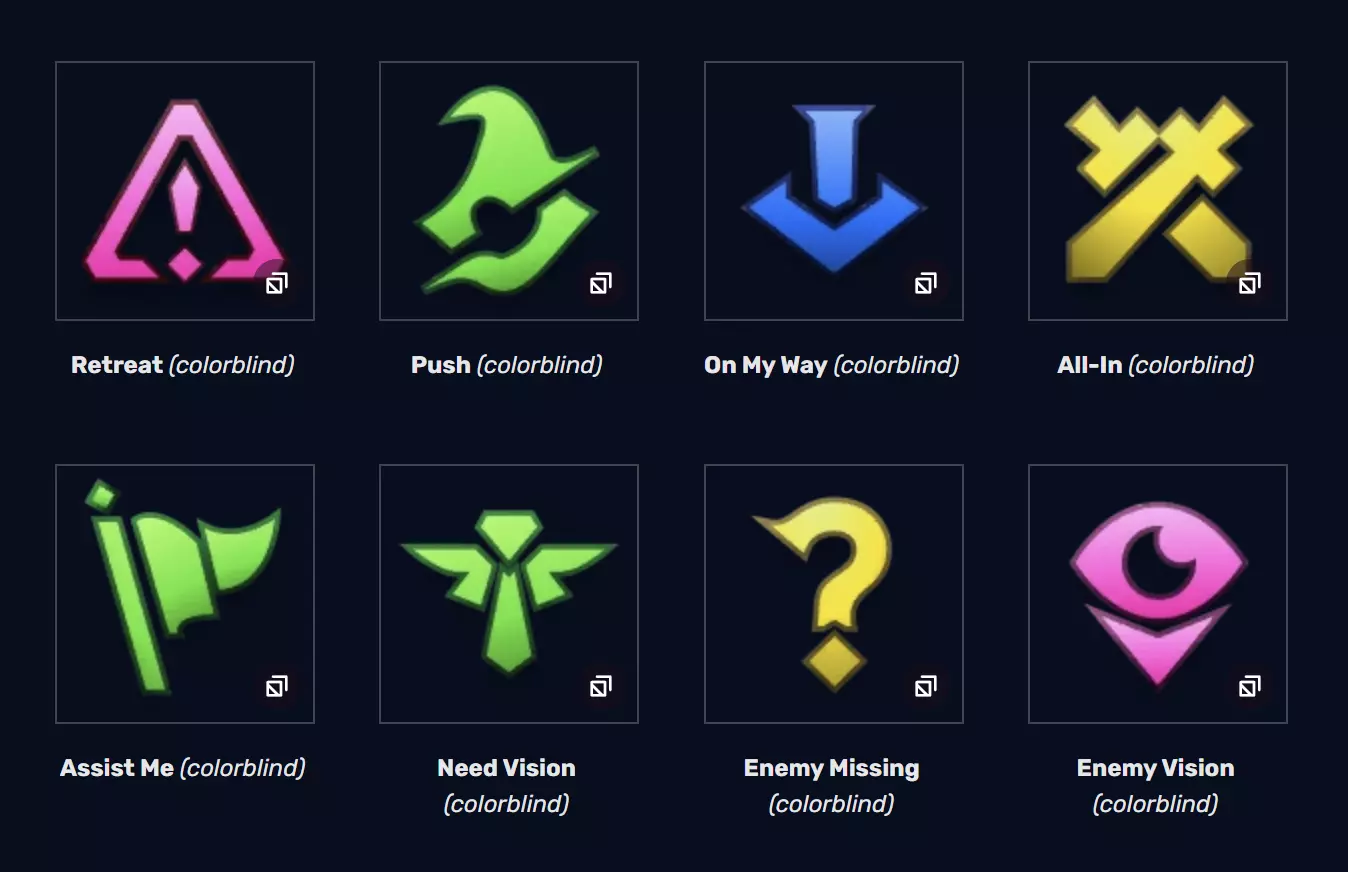
The 8 Smart Pings
- Retreat: Tells teammates to withdraw from an unfavorable situation.
- Push: Indicates that teammates should clear a minion wave.
- On My Way: Signals that you are heading to a specific location.
- All-In: Encourages teammates to engage and start a fight.
- Assist Me: Requests help from allies.
- Need Vision: Asks teammates to place wards for vision.
- Enemy Missing: Alerts teammates that an enemy has disappeared from the lane.
- Enemy Vision: Signals that the enemy team has vision in an area.
Practical Examples of Smart Pings
- Retreat Ping: If your jungler gets caught out near the enemy jungle, use this ping to warn them to back off.
- Need Vision Ping: Before contesting objectives like Dragon, use this ping to request wards.
- On My Way Ping: Use this ping to let your bot lane know you are ganking.
Using the Ping Wheel
The ping wheel makes it easy to access all Smart Pings. It features a simple layout:
- Retreat: North
- Assist Me: South
- On My Way: East
- Enemy Missing: West
- Additional pings like Push, Need Vision, All-In, and Enemy Vision are located diagonally around the wheel.
To use the wheel effectively, practice dragging your mouse quickly in the correct direction to select pings without delay.
How Pings Behave in League of Legends
Pings display visual effects both on the ground and on the mini-map. A ping placed on the main screen lasts 2 seconds, while one placed on the mini-map persists for 5 seconds. Certain pings, like Need Vision, leave an indicator for up to 1 minute or until vision is granted.
If a ping is outside your field of view, an indicator will appear at the edge of your screen, pointing towards the location. This ensures that important pings are noticed even if you’re focused on another part of the map.
Ping Restrictions and Cooldowns
To prevent excessive pinging, there is a global ping limit. After issuing 6 pings within 5 seconds, you will be locked out from using pings for a few seconds. Attempting to ping during this cooldown will send a warning message to your chat, which reads:
"You must wait before issuing more pings."
This restriction prevents spam and ensures pings remain meaningful.
Chat Pings and Transcriptions
Most pings also appear as text in the team chat. This provides an additional layer of communication, particularly useful if someone missed the visual ping.
- Enemy Missing pings appear in chat to warn teammates.
- On My Way pings display the champion’s name and location.
The only ping that does not transcribe to chat is the Generic Ping when used on the map without a target.
Improving Your Gameplay with Pings
Pings are most effective when used sparingly and with purpose. Overusing pings can cause teammates to ignore your alerts. To make the most of pings:
- Use Enemy Missing when your lane opponent disappears.
- Place Need Vision near objectives like Dragon or Baron to prepare for fights.
- Use Caution to warn teammates about potential ganks or ambushes.
- Combine pings: For example, use Assist Me on an enemy turret, followed by Push to clear minions.
Coordinating with pings helps your team make better decisions, secure objectives, and avoid unnecessary fights.
Conclusion
Understanding and mastering pings in League of Legends is a vital skill that separates good players from great ones. Whether you’re signaling a retreat, coordinating an all-in, or warning of missing enemies, pings enable seamless communication without typing. Practice using both Regular and Smart Pings effectively to improve teamwork, awareness, and overall gameplay. With the right pings at the right time, victory on the Rift becomes much more attainable.
Follow Strafe Esports for all the latest League news and our X account for the latest content and coverages. Also, stay tuned to Strafe YouTube for exclusive interviews, press conferences, and more.
Featured Image Credit: Exclusive to Strafe Esports
Read More:
What is Silver Scrapes? League Historical Term and Where It Comes From
The Stoneweaver’s Tale: The Lore of Taliyah in League of Legends