
Best Call of Duty: Warzone PC settings for maximum performance

Best Call of Duty: Warzone PC settings for maximum performance

Ganesh Jadhav

9 Nov, 2023, 11:01

|

Last updated: 10 Apr, 2025, 18:30

The Call of Duty: Warzone Season 1 kicked off on 8th December and has introduced a plethora of new features including a brand new map Urzikstan.

Similar to its predecessors the current Call of Duty: Warzone supports PC. The recommended system requirements for the game are as follows:

  • Processor - Intel® Core™ i5-6600K / Core™ i7-4770 or AMD Ryzen™ 5 1400
  • Graphics Card - NVIDIA® GeForce® GTX 1060 or AMD Radeon™ RX 580 - DirectX 12.0 compatible system
  • RAM - 12 GB
  • Disk Space - 125 GB

These requirements aren’t as heavy, but take a toll on the system, especially your CPU. The strain on the system can lead to frame drops, throttling fps or in-game lag. To avoid such a circumstances, use the following Warzone settings to get maximum performance out of your PC.

Best Call of Duty: Warzone PC settings

Display Settings
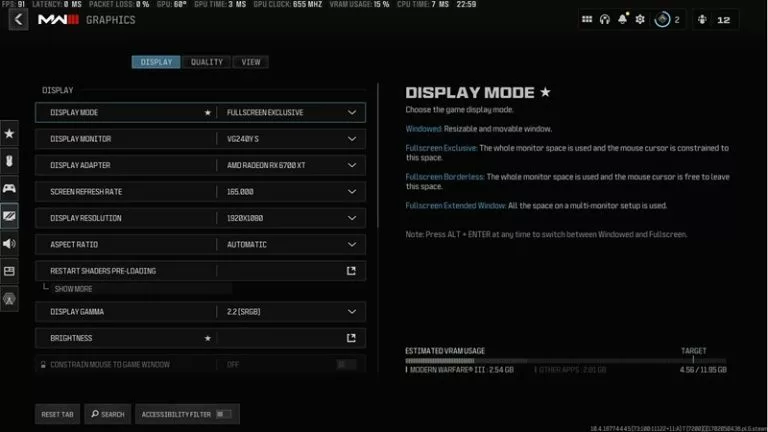
Call of Duty: Warzone II Display Settings (credits: Screeshot via Call of Duty)

  • Display Mode: Fullscreen Exclusive (Using Fullscreen Exclusive gives COD the direct control of the screen and hence leads to a better performance.)
  • Display Monitor: Select your primary monitor.
  • Display Adapter: Select your primary graphics card.
  • Screen Refresh Rate: Select monitor’s refresh rate.
  • Display Resolution: Use the monitor's native resolution.
  • Display Gamma: 2.2 (sRGB)
  • Brightness: Personal preference
  • Eco Mode Preset: Custom
  • V-Sync (Gameplay): Off
  • V-Sync (Menus): Off
  • Custom Frame Rate Limit: Custom
    • Gameplay: 300 (Choose the lowest of 2x monitor refresh rate or 300)
    • Menu: 90
    • Out of focus: 30
  • Focused Mode: 0
  • High Dynamic Range (HDR): Off (Set it off to get a better performance)

Quality Settings
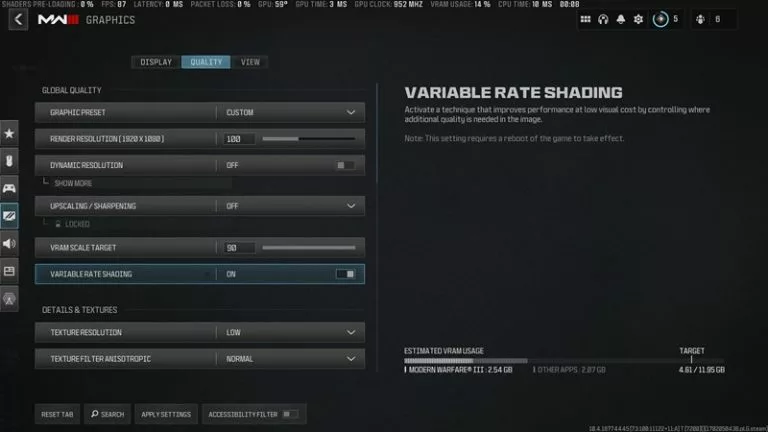
Call of Duty: Warzone II Quality Settings (credits: Screeshot via Call of Duty)

  • Graphic Preset: Custom
  • Render Resolution: 100 (Lower to 75 if the VRAM size is lower)
  • Dynamic Resolution: Off (Increases CPU load)
  • Upscaling / Sharpening: Ideally Off (Use FidelityFX CASS if required with 75 strength)
  • VRAM Scale Target: Maximum
  • Variable Rate Shading: On
  • Texture Resolution: Normal
  • Texture Filter Anisotropic: Normal
  • Depth of Field: Off
  • Detail Quality Level: Normal
  • Particle Resolution: Very Low
  • Bullet Impacts: Off
  • Persistent Effects: Off
  • Shader Quality: Medium
  • On-Demand Texture Streaming: On (can switch it off but lowers visual details)
  • Local Texture Streaming Details: Normal
  • Shadow Quality: Normal
  • Screen Space Shadows: Off
  • Ambient Occlusions: Dynamic Objects
  • Screen Space Reflections: Normal
  • Static Reflection Quality: High
  • Tessellation: Near
  • Volumetric Quality: Medium
  • Deferred Physics Quality: Low
  • Weather Grid Volumes: Normal or Low
  • Water Quality: Water Caustics

View Settings
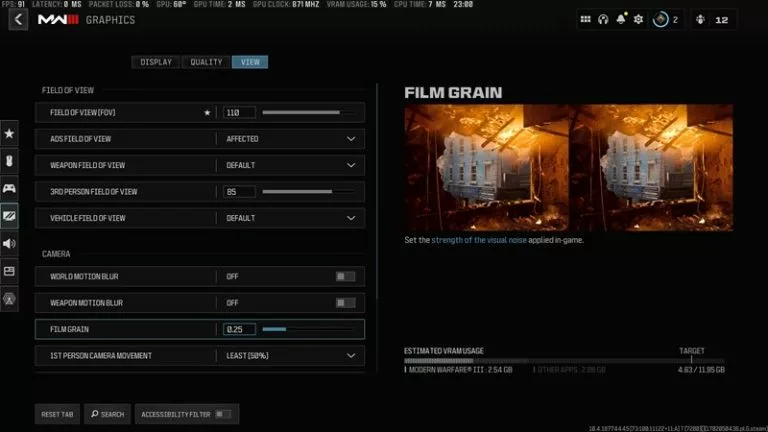
Call of Duty: Warzone II View Settings (credits: Screeshot via Call of Duty)

  • FOV: 100 - 110 (Personal preference)
  • ADS FOV: Affected
  • Weapon FOV: Default
  • 3rd Person FOV: 80 - 100 (Personal preference)
  • Vehicle FOV: Default
  • World Motion Blur: Off
  • Weapon Motion Blur: Off
  • Film Grain 0.25
  • 1st Person Camera Movement: Least
  • 3rd Person Camera Movement: Least
  • 3rd Person ADS transition: Personal preference
  • Spectator Camera: Personal preference
  • Inverted Flashbang: Off

These settings tweak the visual aspects of the game to get maximum performance out of the system. Using the in-game presets also works if you have a Nvidia GeForce RTX 3070 Ti / AMD Radeon 6800 XT card or higher.

Featured Image Credits: Call of Duty Blog

Read More: Call of Duty launches Call of Duty: Warzone Urzikstan trailer
Latest news

Esports Foundation Announces the 40 Clubs for 2026 Club Partner Program

Esports Foundation Announces the 40 Clubs for 2026 Club Partner Program

Today, the Esports Foundation (EF) announced the selected 40 esports clubs for the 2026 Club Partner Program. The program, a $20M dollar initiative, provides funding and support for all the selected clubs. Now in its 3rd year, over $100M has been reportedly invested to date.
31 Mar
Foo Zen-Wen

The Real Pay Gap: Why a Mid-Tier Streamer Often Out-Earns a Pro Player

Compare esports player salary vs streamer income - real numbers, verified data. CS2, Dota 2, LoL pros vs xQc, Ninja, Faker, Full breakdown
26 Mar
Foo Zen-Wen

Brazil's Felca Law Blocks Kids from Multiple Games: What Gamers Need to Know

Brazil's Felca Law takes effect on 17 March 2026 and bans paid loot boxes in games that minors play. It forces Riot Games to set League of Legends and other titles to 18+ in the country, blocking underage accounts until 2027. Free Fire faces redesign of Royales, and Roblox limits chat for kids. Publishers must use CPF checks or biometrics, with fines up to 10% of revenue for violations.
14 Mar
André Guaraldo

"You're Going to Upset Everybody" - Ex-CoD Director Greg Reisdorf on Pros vs Casuals, Leaks, and Developer Ego

Greg Reisdorf served as Multiplayer Creative Director at Sledgehammer Games for over 15 years before departing in early 2025 to co-found Oncade, a direct-to-consumer game distribution platform. After 15 years shaping Call of Duty's multiplayer modes across titles like Advanced Warfare, WWII, and Black Ops Cold War, Greg Reisdorf has seen every version of the franchise's internal friction up close.
12 Mar
Kaustavmani Choudhury

Bach: "One week before Wallachia, we barely played Dota."

After defeating his former teammates, Zhang "Faith_bian" Ruida (also known as Bach) talked about his team's preparations for Wallachia, how they currently draft, and what's changed in his life since his first retirement.
12 Mar
Otomo

Call of Duty Black Ops 7 Season 02 Reloaded Brings Black Ops Royale, Paradox Junction Zombies Map, New Voyak KT-3 Assault Rifle and much more!

Season 02 Reloaded is one of Black Ops 7’s biggest mid-season drops yet, headlined by Black Ops Royale, the Paradox Junction Zombies map, and a new competitive arsenal. This article breaks down every major change for Warzone, Multiplayer, Zombies, and events.
4 Mar
André Guaraldo

Call of Duty Black Ops Royale: All you need to know about Activision's newest Battle Royale

Black Ops Royale is Call of Duty’s boldest Battle Royale experiment since Blackout: a mode inside Warzone that drops loadouts and the Gulag in favor of pure scavenging, Archetype‑driven weapon progression and tactical decision‑making on the new Avalon map. Instead of relying on a perfect pre‑built class, every match becomes a puzzle of rotations, Activities, Cradle Breaches and resource management, all fully tied into Black Ops 7’s progression. Whether you miss the Blackout era or are just tired of “more of the same” in BRs, this guide breaks down everything you need to know before you drop into Avalon.
3 Mar
André Guaraldo

Comments (0)

Log in to comment on this match