
Esports Betting
/
Stake Review
/
Stake Verification
Stake Verification 2026: All Verification Steps Explained
Stake is restricted in your area.
Instead, we recommend the following alternative:

Players accepted in the US

Highlights
- Exclusive 5% Rakeback bonus with code: STFSOCIAL
- Social casino with Stake Originals!
- Play with Stake Cash for prizes!
25 SC and 250K GC signup bonus
Promo Code
Copy
T&Cs / 21+
Last Updated on 25/09/2026
Stake.com is one of the best crypto casinos available right now, and there is a lot of responsibility that comes with being such a highly regarded casino platform. A lot of sites take their time in verifying their bettors before allowing them to fully access their offerings. Stake does not delay players with the same long-winded waits and complicated verification process: Stake.com makes verification simple. That’s the difference that matters, with Stake verification very quick and easy to do, which allowed me to bet right away.
In this guide, I’ll walk you through exactly how the verification works on Stake.com, from the four KYC levels to what kinds of documents are accepted. It’s all based on my own experience after a long time using the site, and I’ve also included a few tips that helped me get approved faster, so you can be fully verified and get into enjoying everything that this platform has to offer. Let’s get into it.
Table of Contents
Why Stake verification exists
Verify your Stake.com account
If you’re new to online casinos, Stake verification might sound intense, but it’s just Stake.com’s way of keeping everything compliant and secure. It’s an identity check that’s meant to:
- Prove you meet the Stake age requirement.
- Confirm you’re using your own account and money
- Comply with anti-money laundering laws (AML/CTF)
- Ensure withdrawals are sent to the right person
Stake.com’s Terms of Service make it clear they can request KYC at any time, not just when you try to withdraw. In practice, that means your account might be limited or frozen until you send in the right documents, especially if you’re cashing out large amounts. Any kind of withdrawal though, for the most part, will require KYC.
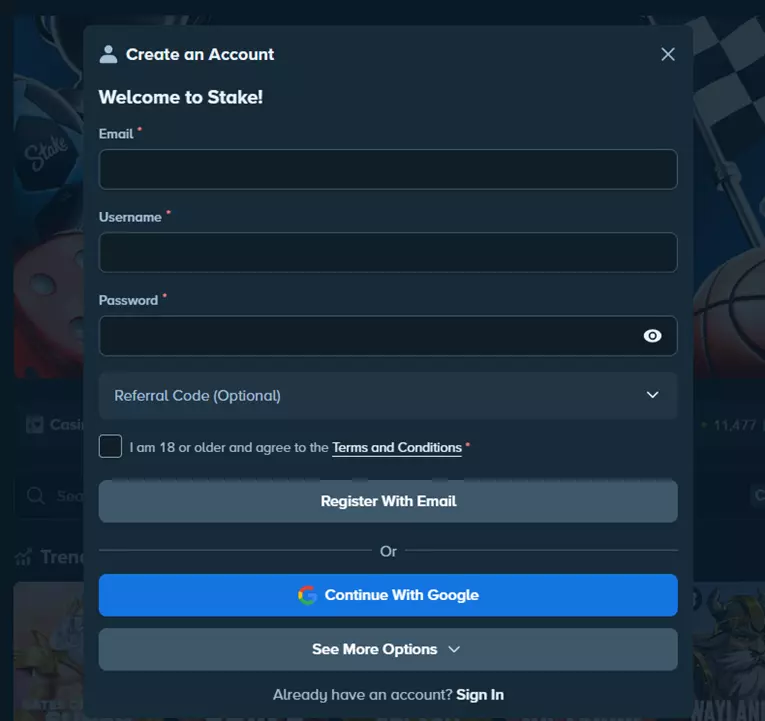
Ultimately, while you can still browse on Stake and use the platform in a limited capacity without KYC requirements, you will eventually need to clear them to some extent in order to actually deposit, play through casino games and withdrew your winnings. But, don't worry: clearing KYC requirements is a lot easier than it seems initially.
After signing up with stake, verification takes place
Stake KYC levels
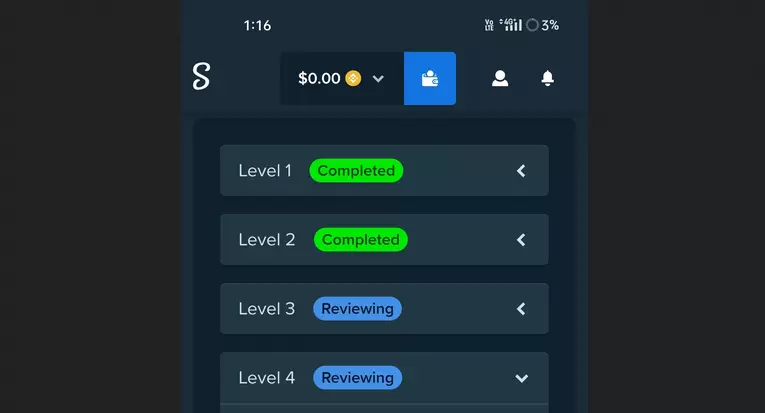
Stake.com’s verification process is divided into five levels. Here’s a quick breakdown of each one and what’s expected.
1️⃣ Level: Basic profile info
This part was quick. I entered my full name, date of birth, and residential address. That was enough to check out the site and make deposits, but I couldn’t withdraw anything yet. This is common among many sites, as it is usually the requirement to initially create an account.
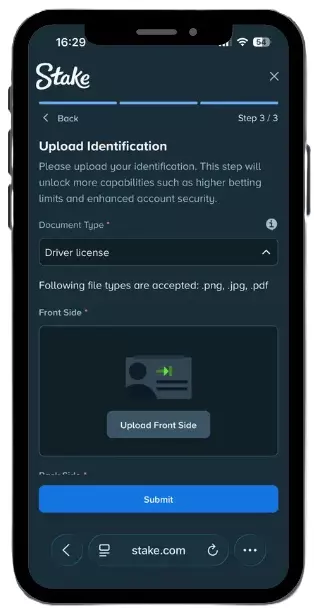
2️⃣ Level: Proof of identity (POI)
Next, I uploaded a photo of my passport. Stake.com also accepts national ID cards or driver’s licenses (front and back), but whatever you use, it needs to be a clear, colour image with all corners visible. Screenshots won’t be accepted, and the document has to be valid. I took a photo on my phone, uploaded it directly, and got approved the same day.
3️⃣ Level: Proof of address (POA)
I used a bank statement downloaded as a PDF, but Stake.com also accepts utility bills, tenancy agreements, and tax letters. Documents need to be less than six months old and clearly show your full name, address, date, and the issuer. Screenshots and cropped images won’t pass, and anything unreadable or in the wrong format will likely get rejected. Some documents can be grey areas, so we would recommend just finding a utility bill or a bank statement, as they usually always clear the verification.
4️⃣ Level: Biometric scan
To finish the initial KYC requirements, you will also be required to submit a biometric scan. This sounds a lot more complicated than it actually is, as all you need to do is to submit a number of selfies, head on, and from some angles to the side. The purpose of these selfies is to verify you are the person you are claiming to be: essentially that your current images match your ID documents.
5️⃣ Level: Proof of source of funds (SOF)
Stake.com didn’t ask me for this right away, but it can pop up if your activity increases or you request a large withdrawal. You’ll need to show where your funds are coming from, like recent payslips, bank statements, tax documents, or investment records. Everything has to be submitted as a PDF or original photo, and it’s usually best to show a few months of consistent income. If anything’s unclear, Stake’s customer support can walk you through it. I tested it once and got a helpful reply in minutes.
| KYC Level | Requirement Type | Examples | Format Rules |
|---|---|---|---|
| Level 1 | Profile Info | Name, Address, DOB | Must match documents used in later steps |
| Level 2 | Government ID | Passport, ID Card, Driver’s Licence | Colour image, all corners visible |
| Level 3 | Proof of Address | Utility bill, bank statement, tenancy | Dated within 6 months, no screenshots |
| Level 4 | Source of Funds | Salary, investments, inheritance | Original PDFs/photos, must show trail |
Submitting everything
The process lives inside the “Verification” tab under your account settings. I followed the steps in order, no skipping ahead. This doesn’t take a lot of time, as Stake.com’s speedy process makes it quite easy for bettors to accomplish.
-
ID Upload & selfie
When I hit Level 2, Stake.com asked for a selfie holding my ID. Their guide was pretty useful. The requirements are:
- No glasses or hats
- Good lighting
- Face and ID are both fully visible
- Original file (no filters or edits)
-
Address proof tips
I used a bank statement from my mobile banking app, but I had to export it as a PDF instead of taking a screenshot. Stake.com rejected the first upload because it was missing the date on the front page.
So, make sure to submit the complete details needed as you may repeat this step should you fail to notice the little details. An image of an actual document can also work, but just make sure the lighting is good and all the necessary details are visible in the image.
-
Source of funds (if requested)
Stake.com didn’t ask me for this highest level of verification right away. But I’ve seen others get flagged after high-value withdrawals. When that happens, uploading your salary slips and bank records with matching entries seems to be the best route.
The Verification Levels at stake.com
When does Stake.com request verification?
Anytime. It doesn’t matter if your account is brand new or years old, Stake.com can trigger KYC checks whenever needed. A few common moments when it might happen:
- Trying to withdraw for the first time
- Suddenly increasing your play volume
- Logging in from a new country or device
- Winning a big prize
Stake.com’s Terms are clear. They can restrict or delay withdrawals until your identity and documents are fully verified.
The welcome bonus I got
When I signed up, I used our Strafe bonus code and unlocked a 200% bonus up to $1,000, as well as 5% rakeback on all losses.
That offer was specific to my location and might not show for everyone, as Stake.com’s bonuses are geo-targeted. So it could be completely different if you’re in another location where Stake.com is legal.
Grab your great Stake Welcome Bonus
Conclusion: “ID please”
Stake.com’s verification feels more serious than most platforms I’ve used, but not in a bad way. The Stake owner is just thorough with their security.
If you follow their formatting rules, it moves pretty quickly. I liked how everything was broken into levels and clearly explained in their Help Center. Would I recommend verifying early? Definitely. Especially before you hit withdraw. It’s one of those things that’s better to handle upfront than when you’re trying to cash out. Do it early, and you’ll thank yourself later.
Ready to get verified with a speedy process? Just check out the links on the banners to get started at Stake.com.
FAQ’s
🛑 Do I have to verify to withdraw?
Yes. Stake.com can hold or deny a withdrawal until you’ve passed KYC and submitted all required documents.
🪪 What’s valid for identity?
Passport, driver’s license, or national ID (both sides). Must be clear, uncropped, and in colour.
🏠 What’s valid proof of address?
Utility bills, tenancy agreements, or bank statements issued within 6 months and showing your name, address, issuer, and date.
💰 What counts as a source of funds?
Salary slips, bank statements, investment docs, etc. Choose what best shows your funding trail.
⏱️ How long does verification take?
It varies. My Level 2 check took under 24 hours. Level 3 took about 48. Level 4 depends on what you submit and how complete it is.
Further Reviews
7.
Betr Review
Others
9.
Stake Review
10.
10bet Review
11.
Picklebet Review
12.
BC.GAME Review
13.
Roobet Review
15.
Shuffle Review
16.
Betway Review
17.
Casumo Review
19.
Bet Panda Review
20.
Betano Review
21.
NEO.bet Review
22.
Novibet Review
25.
BetMGM UK Review
26.
Borgata Review
28.
BiggerZ Review
29.
Rainbet Review
30.
Unibet Review
31.
LeoVegas Review
32.
Metawin Review
33.
JB.com Review
34.
NetBet Review
35.
Winna.com Review
36.
QuinnBet Review
37.
FS.Casino Review
38.
vega.bet Review
40.
32Red Review
41.
Playa Review
42.
GG.Bet Review
43.
USpin.me Review
44.
Punkz Review
46.
Karamba Review
47.
Duelbits Review
48.
Mint.io Review
49.
Betfred Review
50.
FieryPlay Review
52.
Dabble Review
53.
HighBet Review
55.
Spreadex Review
56.
Whale.io Review
57.
888 Review
58.
22BET Review
59.
RakeBit Review
60.
ComeOn Review
61.
Betsson Review
63.
Bethard Review
64.
1BET Review
65.
Betsafe Review
66.
Vave Review
67.
SunBet Review
68.
Slotimo Review
71.
20BET Review
73.
BetnFlix Review
74.
Thrill Review
76.
Acebet Review
77.
Bets.io Review
78.
N1 Bet Review
79.
Mostbet Review
80.
NextBet Review
81.
Coin Play Review
83.
BetBoom Review
84.
1xbet Review
85.
Evobet Review
86.
BetFury Review
87.
Parimatch Review
90.
Metaspins Review
91.
Bitsler Review
92.
PalmSlots Review
94.
Betibet Review
96.
1Red Review
97.
Kingmaker Review
98.
Bet UK Review
99.
Betvictor Review
100.
Fairspin Review
101.
Casabet Review
102.
Golden Nugget Review
103.
PartyCasino Review
104.
Marathonbet Review
105.
lynxbet Review
106.
BillyBets Review
107.
BlueBet Review
108.
Betwinner Review
109.
Cyber.bet Review
110.
ZodiacBet Review
111.
BetCoco Review
112.
188Bet Review
113.
OceanBet Review
114.
Fast Slots Review
115.
Betdaq Review
117.
Rollino Review
118.
Hey Spin Review
119.
Wazamba Review
120.
Crashino Review
121.
BetsAmigo Review
122.
FezBet Review
123.
Playfast Review
124.
Bet Riot Review
125.
Mr Vegas Review
126.
Betrino Review
127.
Bet Alice Review
128.
Monkey Tilt Review
129.
Razed.com Review
130.
Luckland Review
131.
VegasNova Review
132.
LetsJackpot Review
133.
BetandPlay Review
134.
Bet and You Review
135.
Snatch Casino Review
136.
Chips.gg Review
137.
Yeet Review
138.
Duel Review
139.
PNXBET Review
140.
Lottoland Review
141.
William Hill Review
142.
V.Vegas Review
143.
Casinoin Review
145.
Mobilebet Review
146.
ivibet Review
147.
Pokerstars Review
148.
YYYCasino Review
149.
CryptoRoyal Review
150.
dafabet Review
151.
Coral Review
152.
Bet Regal Review
153.
mr.play Review
154.
Bombastic Review
155.
31Bet Review
156.
Guts Review
157.
Rollbit Review
158.
Fubo Review
159.
Powbet Review
160.
MrRex Review
161.
3et Review
162.
Sportaza Review
163.
Grosvenor Review
164.
Rizzio Review
165.
SportingIndex Review
166.
4raBet Review
167.
Sugarhouse Review
168.
Bahigo Review
169.
bzeebet Review
170.
21LuckyBet Review
171.
Weiss Review
172.
Megapari Review
174.
Cooked Review
175.
Winnerz Review
177.
BetParx Review
178.
PointsBet Review
179.
Menace Review
180.
Rabona Review
181.
Tipico Review
182.
Bally Bet Review
183.
BTC365 Review
184.
WarriorBet Review
185.
Betiton Review
186.
Winners.bet Review
187.
K8.io Review
188.
Zeno Bet Review
189.
BetWarrior Review
190.
Amuletobet Review
191.
pin-up Review
192.
Rocketplay Review
193.
Sultanbet Review
194.
Betfan Review
195.
SG Casino Review
196.
Spreads.ca Review
197.
STS Review
198.
Pure Win Review
199.
Slottica Review
200.
PZBuk Review
201.
forBET Review
202.
BetSwap Review
203.
Rajabets Review
205.
Fox Bet Review
206.
Gogawi Review
207.
1win Review
208.
BetHog Review
209.
LV BET Review
210.
Mr. Green Review
211.
Sportingbet Review
213.
ClutchBet Review
214.
Funbet Review
215.
Justbit.io Review
216.
Pixel.gg Review
217.
Tonybet Review
218.
Nucleonbet Review
219.
ESPN Bet Review
220.
Pinnacle Review
221.
Melbet Review
222.
FuturePlay Review
223.
TG Casino Review
224.
eWinner Review
225.
Rivalry Review
226.
BigWinner Review
227.
MrBen Review
228.
MrRun Review
229.
BET.co.za Review
230.
bet.pt Review
231.
Playbet Review
232.
Ladbrokes Review
233.
Kineko Review
234.
Mega Dice Review
235.
Boomerang-bet Review
236.
luckyblock Review
239.
Yolo Review
240.
Campobet Review
241.
The Score Review
242.
Alphabookbet Review
243.
Biamo.bet Review
244.
BeeBet Review
245.
Loot.Bet Review
247.
Luckbox Review
248.
FansBet Review
249.
Fitzdares Review
250.
CopyBet Review
251.
Unikrn Review
252.
Betfair Review
253.
TexBet Review
254.
Grandzbet Review
255.
WynnBET Review
256.
SlotV Review
257.
SI Sportsbook Review
More Articles Related to Stake
- Stake Review for October 2026 - Is it legit and safe to play?
- Best Crypto Wallet for Stake 2026: A Comprehensive Comparison of the Top Wallets for Stake.com
- Best Games on Stake.com in 2026 - Stake Game List & New Promo (Use Code: STRAFECASVIP)
- Can you make money on Stake.com Casino? Get expert tips on the top games with our step-by-step guides 2026
- Drake x Stake: All You Need to Know 2026
- Is Stake Legal In Australia? October Review
- Is Stake legal in India? Stake.com Review India 2026
- Is Stake Legal In Ireland? October Review
- Is Stake Legal In Ontario? Stake Ontario Review 2026
- Is Stake Legal In South Africa? October Review
- Is Stake Legal In The USA? October Review
- Is Stake Rigged? All You Need to Know
- Make the Best Present! Get Stake.com Gift Card 2026
- Roobet vs Stake 2026: Which Site is better?
- Slide Stake Guide 2026
- Stake Age Requirement 2026: How Old Do You Have to Be to Use Stake.com?
- Stake Aviamasters 2026: Play Aviamasters on Stake.com
- Stake Aviator 2026: Play Aviator on Stake.com (+Free Bonus)
- Stake Bars: Everything You Need to Know About The Latest Stake Original Game
- Stake Betting 2026: Unbiased Stake.com Sportsbook Review
- Stake Birthday Bonus 2026: Claim Your Exclusive Stake.com Birthday Gift
- Stake Blackjack 2026: Guide, Promo & Strategy
- Stake Bonus Drop Code Today 2026: Latest Drop Codes for October
- Stake Brazil Review 2026: Is Stake.com Legal in Brazil?
- Stake Chicken Game 2026: Play Chicken Game on Stake.com (+Free Bonus)
- Stake Colombia Review 2026: Is Stake.com Legal in Columbia?
- Stake Crash Predictor: Bullet-proof Crash Game Strategy 2026
- Stake Crossy Road 2026: Play Mission Uncrossable on Stake.com
- Stake Customer Support: How to get Fast & Reliable Help on Stake.com
- Stake Demo: How to Play Demo Games on Stake.com
- Stake Deposit Methods 2026: How to deposit Money in Stake.com
- Stake Dice Strategy 2026 - How to win at Dice (Best Stake Dice Strategy Explained)
- Stake F1 2026: Stake.com F1 Team Guide
- Stake Flip 2026: Play Flip on Stake.com (+Free Bonus)
- Stake Free 7 Dollars 2026: How to Claim free $7 on Stake.com
- Stake Free Money 2026: Claim $5 Free Cash on Stake.com Casino
- Stake Free Play 2026: Claim Your Free Bonus Now
- Stake Headquarters 2026 + Stake Company Info
- Stake Hilo Strategy for October: How to win at Hi Lo
- Stake India Deposit Guide 2026: Understanding Payment Options and Procedures
- Stake India Free Money 2026: Your Guide to Unlocking Free Credits Using Promo Codes
- Stake India Free Spins 2026: Your Guide to Current Bonus Codes and Spins Offers
- Stake India Minimum Deposit 2026: Understanding Deposit Limits and Payment Options
- Stake India No Deposit Bonus 2026: Your Guide to Casino Rewards & Strategies
- Stake India Withdrawal Time 2026: Comprehensive Guide on Limits and Processing Speed
- Stake Indonesia Review 2026: Is Stake.com Legal in Indonesia?
- Stake IPL Early Sixes Bet 2026: Who Will Hit Early Sixes?
- Stake IPL Promo Code 2026: Get the Latest Stake IPL Offers on Today
- Stake Limbo 2026: Guide, Promo & Strategy
- Stake Mines: Calculator & Strategy 2026
- Stake Mirrors 2026 - Best Stake.com Casino Mirror Sites
- Stake Monthly Bonus Calculator: Weekly, Monthly & VIP Calculations
- Stake No Deposit Bonus 2026: Claim Your Stake.com Casino No Deposit Bonus
- Stake Odds 2026: How Stake.com Odds work
- Stake Originals 2026: Play the best Stake.com Games (RTP, Volatility and more)
- Stake Owner 2026: Who owns Stake.com Casino?
- Stake Packs: Everything You Need to Know About The Latest Stake Original Game
- Stake PayPal 2026: Is it possible to use PayPal on Stake.com?
- Stake Peru Review 2026: Is Stake.com Legal in Peru?
- Stake Philippines Review 2026: Is Stake.com Legal in Philippines?
- Stake Plane Game 2026: Guide, Promo & Strategy
- Stake Platinum Bonus 2026: Claim Your Stake.com Platinum VIP Bonus
- Stake Poker Review 2026: How to Claim
- Stake Pragmatic Play: Drops, Games & Promos
- Stake Prime Dice: Everything You Need to Know About The Latest Stake Original Game
- Stake Referral Code 2026 - Claim Your Exclusive Promo: STRAFECASVIP
- Stake Rock Paper Scissors: Everything You Need to Know About The Latest Stake Original Game
- Stake Sign Up Bonus 2026: Claim Your Stake.com Sign Up Bonus Now
- Stake Slots 2026 - Find The Best Slot Games on Stake.com
- Stake Snakes 2026: Play Snakes on Stake.com (+Free Bonus)
- Stake Sportsbook Review 2026: How good is Sports Betting on Stake.com
- Stake Sweet Bonanza 2026: Guide, Promo & Strategy
- Stake Telegram Channel: Promos, Drops & Infos
- Stake Tome of Life: Everything You Need to Know About The Latest Stake Original Game
- Stake UFC 2026: MMA Betting, Odds & Strategies (+Promo Code)
- Stake UK Review | Exclusive new promo code STRAFECASVIP
- Stake VIP Calculator: Check Your Bonus Now!
- Stake VIP Levels 2026: How to Become Stake.com VIP Member?
- Stake VPN Guide: All You Need to Know 2026
- Stake Welcome Bonus 2026: Claim Your Stake.com Welcome Offer Code
- Stake Withdrawal Time 2026: How long does it take to withdrawal on Stake.com
- Stake.com Alternatives 2026 - Find The Best Stake Alternative for Sports Betting & Casino
- Stake.com App Review 2026: Can you play on the stake.com mobile app?
- Stake.com Baccarat Guide 2026
- Stake.com Blue Samurai Guide 2026
- Stake.com Bonus for October - Exclusive Promo Code & Sign Up Offer
- Stake.com Canada - Reviewed & Rated 2026
- Stake.com Cases: Learn How This Stake Original Game Works
- Stake.com Cricket Betting: Claim Your Bonus (Exclusive Promo)
- Stake.com Crypto Casino 2026 — Does Stake.com accept Crypto?
- Stake.com Diamonds Guide 2026
- Stake.com Dragon Tower Guide 2026
- Stake.com esittely
- Stake.com Free Spins (No Deposit): Claim Stake Casino Free Spins Today! Code: STRAFECASVIP
- Stake.com Hacks for 2026: 7 Hacks and Hints You Need to Know!
- Stake.com IPL Betting: Claim Your IPL Bonus (Free Promo Code)
- Stake.com Keno Guide 2026
- Stake.com Kick: All You Need to Know 2026
- Stake.com Payment Methods 2026: How to Add Money on Stake (Use Code: STRAFECASVIP)
- Stake.com Plinko 2026 - What is Plinko? (Strategy Guide & Gambling Odds)
- Stake.com Pump Game 2026: Explore Features and Gameplay
- Stake.com Rakeback 2026: Claim Exclusive Rakeback on Stake
- Stake.com Roulette 2026 - Guide & Rules (Minimum and Max Bet Explained)
- Stake.com Scarab Spin Guide 2026
- Stake.com Strategy 2026 - Best Stake Strategies You Need To Know (Use Code: STRAFECASVIP)
- Stake.com Video Poker Guide 2026
- Stake.com VIP 2026 - Get Your Exclusive VIP Bonus Code: STRAFECASVIP
- Stake.com Weekly Giveaway 2026: Promotion & Winners
- Stake.com Wheel Guide 2026
- Stake.com Withdrawal Limit 2026 - Payout & Cashout Terms (Exclusive Code: STRAFECASVIP)
- Stake.com: notre review complète de ce site de pari
- ULASAN & PERINGKAT STAKE.COM 2026
- Where is Stake.com Legal? All Countries where Stake is Available in
- Обзор Stake.com - Рейтинг игр и ставок Stake
- दांव पर बहुत सारे! Stake.com की समीक्षा और रेटिंग 2026
- 위태롭습니다! Stake.com 리뷰 및 평가 2026

4.9/5
Gambling problem? Call 1-800-GAMBLER or 1-800-MY-RESET (Available in the US) 877-8-HOPENY or text HOPENY (467369) (NY) 1-800-327-5050 (MA), 1-800-BETS-OFF (IA), 1-800-981-0023 (PR). 21+ only. Please Gamble Responsibly. See BetMGM.com for Terms. First Bet Offer for new customers only (if applicable). Subject to eligibility requirements. Bonus bets are non-withdrawable. In partnership with Kansas Crossing Casino and Hotel. Promotional offers not available in Mississippi, Massachusetts, New York, Ontario, or Puerto Rico.

4.8/5
GAMBLING PROBLEM? CALL 1-800-GAMBLER or 1-800-MY-RESET, (800) 327-5050 or visit gamblinghelplinema.org (MA). Please Gamble Responsibly. 888-789-7777/visit ccpg.org (CT), or visit www.mdgamblinghelp.org (MD), 1-800-981-0023 (PR). 21+ and present in most states. (18+ DC/NH/PR/WY). Void in CAN. Eligibility restrictions apply. On behalf of Boot Hill Casino (KS). Pass-thru of per wager tax may apply in IL. 1 per new Sportsbook customer. $5+ first-time bet req. Max. $200 issued as non-withdrawable Bonus Bets. Stake removed from payout. Reward issued as $50 in Bonus Bets every 7 days via click-to-claim for 21 days. Bonus Bets and click-to-claims expire 7 days (168hrs) after issuance. Terms: dkng.co/offer. Get 1 promo code to redeem a 3-month NBA League Pass subscription, complimentary of DraftKings. Subscription auto-renews monthly at then-current price (currently $16.99/mo); cancel anytime. Terms, restrictions, and eligibility requirements apply. Redeem League Pass by 12/19/26 at 11:59 PM ET. Addt’l terms: support.watch.nba.com/hc/en-us/articles/9165532876183-League-Pass-Terms-of-Use_. Ends 11/29/26 at 11:59 PM ET. Sponsored by DK.

4.8/5
Gambling Problem? Call 1-800-GAMBLER or 1-800-MY-RESET. Call 1-888-789-7777 or visit ccpgg.org/chat (CT). Hope is here. GamblingHelpLineMA.org or call (800) 327-5050 for 24/7 support (MA). Visit www.mdgamblinghelp.org (MD). Call 1-877-8HOPE-NY or text HOPENY (NY). 21+ (18+ DC, WY) and present in select states (for KS, in affiliation with Kansas Star Casino). Find online real money wagering only. Min $5 wager required for 7 consecutive days. $5 free play credit. Bonus issued as non-withdrawable bonus with cash withdrawable bonus with cash withdrawable. Bonus bets which expire 7 days after receipt. Restrictions apply. See terms at sportsbook.fanduel.com. Call 1-877-770-7867 (LA).

4.7/5
Must be 21+. GAMBLING PROBLEM? CALL 1-800-GAMBLER OR CALL 1-800-MY-RESET, www.mdgamblinghelp.org (MD), (800)-327-5050 or gamblinghelplinema.org (MA), Call (877)8-HOPENY or text HOPENY (467369) (NY), (888) 789-7777 or ccpg.org (CT), morethanagame.nc.gov (NC), 1800gambler.net (WV)

4.5/5
Whatever the moment. It's Never Ordinary at bet365. That's why if you sign up now you will receive $150 in Bonus Bets Win or Lose when you bet $5! Minimum $10 deposit required. Minimum odds -500 or greater. Bonus Bets wager excluded from returns. New customers only. T&CS, time limits and exclusions apply.GAMBLING PROBLEM? CALL 1-800-MY-RESET. 21+ (AZ/CO/IL/IN/KS/KY/LA/MD/NC/NJ/OH/PA/TN/VA) or 1-800-BETS OFF (IA). 21+ (18+ KY). Must be present in AZ/CO/IA/IL/IN/KS/KY/LA (select parishes)/MD/NC/NJ/OH/PA/TN/VA.
More Great Offers
MORE ON ESPORTS
🥇 COMPETITIVE ESPORTS
🔥 NEWS & HOT TOPICS
Our Team